

What Does By Mention Mean on Snapchat? Full Guide (2026)
Have you ever opened Snapchat and seen a friend request labeled “Added by Mention”? It can feel confusing. You may wonder how that person found your profile or where they saw your username.
This tag appears when someone sees your username in a Story or Snap. Another user tagged you using the @username feature. When others view that content, they can tap your name and send you a friend request.
In this guide, you will learn what “By Mention” means, how it works, and why people add you this way. You will also learn how to manage mentions and control who can find your profile.
What Is a Mention on Snapchat?
On Snapchat, a mention means tagging someone using their username. You can do this by typing @username in a Story or Snap. When you mention someone, their username becomes clickable. Anyone who views your content can tap that name and visit their profile.
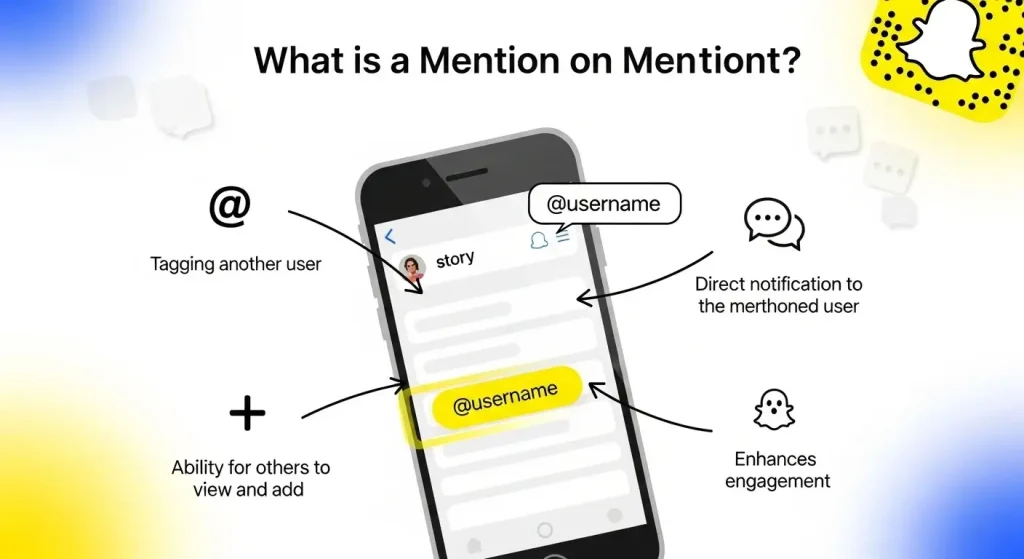
This feature works like tagging on other social platforms. It helps users share profiles, give shoutouts, or highlight friends in their content. Mentions also increase visibility. If your username appears in a public or widely viewed Story, more people can discover your profile.
This is why you may receive friend requests labeled “Added by Mention”. It means someone found your profile through a tag in a Snap or Story. If you are trying to understand how Snapchat labels, friend requests, and profile features connect, our Snapchat feature system guide can help you understand the bigger picture.
What Is “Added By Mention” on Snapchat?
On Snapchat, “Added by Mention” means someone added you after seeing your username in a Story or Snap. Another user tagged you using the @username feature.

When people view that content, they can tap your username and open your profile. From there, they can send you a friend request. Snapchat then shows “Added by Mention” to explain how they found you.
This method is different from search or Quick Add. It shows that your profile was discovered through a mention, not by typing your name manually. Mentions make Snapchat more social and interactive. They help users connect quickly through shared content, mutual friends, or public stories.
How “Added by Mention” Works on Snapchat
Here’s how the process works step by step on Snapchat:
- Someone tags your username
A user adds your username in their Story or Snap using @username.
- Viewers see your tag
People who watch that Story or Snap notice your tagged username.
- They tap your profile
They tap your name to open your Snapchat profile instantly.
- They send a friend request
They tap the Add button to send you a request.
- Snapchat labels it “Added by Mention.”
Snapchat shows this label to tell you they found you through a mention, not search or Quick Add.
This process makes it easy for users to discover profiles through shared content and connect in seconds.
Why You See “Added by Mention” on Snapchat
You may see “Added by Mention” on Snapchat for a few common reasons. It always means someone found your profile through a tag.
You were tagged in a Story or Snap: A friend mentioned your username using @username. People who viewed that content could tap your name and add you.
Your tag appeared in a shared Story: Someone may have shared or reposted a Story where your username was tagged. This increases your visibility to more users.
Your username was seen in a public Story: If your tag appears in a public Story, many viewers can discover your profile and send requests.
Someone explored your profile through a mention: Users often tap tagged names out of curiosity. If they like your profile, they may send a request.
Understanding these situations helps you stay in control. You can manage who adds you and adjust your privacy settings when needed.
Other Add Methods on Snapchat
Understanding different add methods on Snapchat helps you know how people find your profile. “Added by Mention” is just one method. Here are other common ways users add friends:
Added by Search
This method requires manual effort. A user types your username in the search bar to find your profile. It does not involve Stories or tags. It is a direct and intentional way to add someone.
Quick Add
Quick Add suggests profiles based on mutual friends or synced contacts. Snapchat uses an algorithm to recommend people you may know. Users can add others with one tap, without searching or tagging.
Added from Contacts
Snapchat can match your phone contacts with existing accounts. When you sync contacts, the app shows profiles linked to saved numbers or emails. This method works automatically and does not involve Stories or Snaps.
Added by Snapcode
Each user has a unique Snapcode, similar to a QR code. Others can scan this code to open your profile and add you. This method requires a direct scan, usually in person or from an image.
If a friend request appears with an icon instead of a clear label, our guide on the X on Snapchat explains how pending, ignored, or incomplete friend connections can appear in the app.
How It Differs from “Added by Mention”
“Added by Mention” happens inside a Story or Snap. A tagged username becomes clickable, making the process quick and natural. Unlike other methods, it depends on content visibility rather than search or suggestions.
Knowing these methods helps you understand where friend requests come from. It also helps you manage your privacy and control who can find your profile.
How to Add Someone by Mention on Snapchat
Adding friends through mentions makes Snapchat more interactive and social. Here’s how it works.
Step-by-Step: Add via Mention Tag
- Open a Snap or Story where a user is tagged.
- Tap the tagged username.
- Press Add to send a friend request.
Snapchat will label the request as “Added by Mention”, showing it came from a tag rather than search or Quick Add.
How to Mention People in Snaps & Stories
- Open the Snapchat camera and create a Snap or Story.
- Tap the text icon and type @username to tag someone. Snapchat’s official help page also explains that you can mention friends in your Snap by tapping “@” and choosing their username.
- Post your Snap or Story.
Anyone who sees your mention can tap the tag and add that user directly. This builds natural, social connections without extra effort. Because mentions often appear inside Stories, you may also notice Story indicators like the purple circle on Snapchat when someone has new or unviewed Story content.
Why You Were “Added by Mention” But Nobody Mentioned You
Sometimes, you may see “Added by Mention” even if you think no one tagged you. Here’s why it happens:
Privacy & Tips for Mentions
Mentions on Snapchat let people tag you, but managing privacy is essential. Here’s how to stay in control:
Control Who Can Tag You
Adjust your Story settings to “Friends Only” or select specific viewers for certain Stories. This limits who can mention you.
Turn Off Mention Notifications
You can disable notifications for mentions. This prevents unexpected alerts from people tagging you.
Limit Story Audience
By customizing your Story audience, you control who sees and tags your content. This keeps connections safe and private.
Following these steps helps you enjoy Snapchat mentions without compromising privacy or receiving unwanted friend requests.
Common Issues With “By Mention” & How to Fix Them
The “Added by Mention” feature is helpful but can sometimes behave unexpectedly. Here are common problems and solutions:
Mention Not Showing Up
If a tag doesn’t appear, it may be due to a small Story audience or the tagger’s privacy settings.
Fix: Update Snapchat or refresh your feed to resolve the issue.
“Added by Mention” Not Updating
Occasionally, Snapchat takes time to label a friend request accurately. Slow servers or recent Stories can cause delays.
Fix: Ensure a stable internet connection and wait a few minutes for updates.
Tag Feature Missing
Unable to tag someone? This can happen if your app is outdated or tagging is disabled in settings.
Fix: Update or reinstall Snapchat to restore the tag feature.
By understanding these issues, you can enjoy the Added by Mention feature smoothly and manage friend requests efficiently.
When “By Mention” Might Be Wrong or Misleading
Sometimes, “Added by Mention” appears even if no one tagged you. This can happen due to system quirks or temporary bugs.
Snapchat System Confusion
The app gathers information from Stories, cache, and tagging suggestions. Occasionally, it may mislabel how someone found your profile.
Corrupted Cache
An old or corrupted cache can show outdated add sources. Even if the original tag is gone, the label may persist.
Auto-Suggested Usernames
When someone types @, Snapchat may auto-suggest your username. A tap from this suggestion can trigger “Added by Mention.”
Fix: Refresh the app or clear the cache to correct these misleading labels. This ensures friend requests reflect accurate mention activity.
Who Can Mention or Tag You on Snapchat
Anyone who can see your Story has the ability to tag your username. This is why mentions sometimes appear unexpectedly.
Public Stories
If your Stories are public, friends and non-friends alike can mention or tag your profile in their Snaps.
Friends-Only Stories
When you restrict Stories to friends only, tagging is limited to your existing circle.
Adjusting Privacy Settings
You can control who tags you anytime in Privacy Settings. Limiting tags helps reduce random ads and keeps your profile interactions safer, similar to managing other Snapchat features like time-sensitive Stories.
FAQs
Conclusion
The “Added by Mention” label shows that someone found your profile through a tag in a Story or Snap. It doesn’t always mean you were directly mentioned, as glitches, auto-suggestions, or privacy settings can affect the label. Understanding this feature helps you manage friend requests, control who can tag you, and stay in charge of your visibility on Snapchat.