

What Does X Mean on Snapchat? Full 2026 Guide
Seeing an X next to someone’s name on Snapchat can be confusing, especially if you were chatting with that person before. Your first thought might be: did they block me, remove me, or ignore my friend request?
In most cases, the X on Snapchat means there is some kind of unaccepted or incomplete friend connection. It may appear when someone sent you a friend request, when you have not accepted them yet, when they messaged you without being your friend, or when Snapchat has not fully updated the friend status.
The good news is that the X does not automatically mean you were blocked. Snapchat uses different signs for pending messages, ignored requests, removed friends, and blocked accounts. Once you understand the difference, the icon becomes much easier to read.
This guide explains what the X means on Snapchat, why it appears next to a name, what happens when you tap it, and how to remove it safely.
Quick Answer: What Does the X on Snapchat Mean?
The X on Snapchat usually means Snapchat does not currently treat that person as a fully added friend in that specific place in the app.
Most often, it appears when someone has sent you a friend request, and you have not accepted it yet. It may also show when a person messages you without being on your friends list, when a previous friend connection changes, or when Snapchat has not updated the status properly.
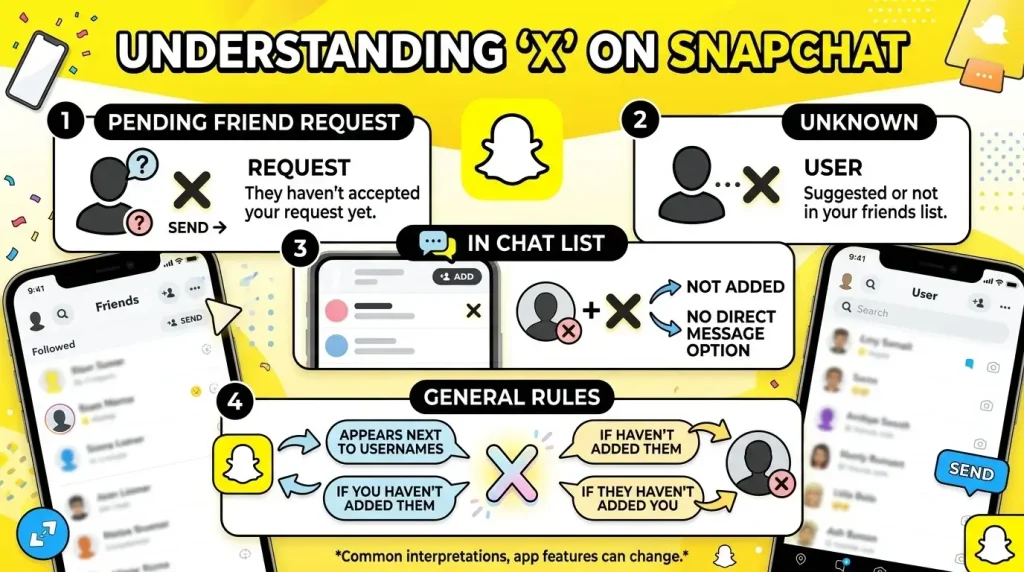
The X does not always mean blocked. If someone blocked you, you usually would not see their profile or conversation in the same normal way. The X is more commonly linked to friend requests, unadded users, ignored requests, or incomplete friend status.
A simple way to read it:
- X next to a name = check the friend/request status
- Gray pending arrow = your Snap or message has not fully delivered
- No profile found = the person may have blocked you, deleted the account, or changed their username
- Add Friend button = you are not currently added as friends
So before assuming the worst, tap carefully, check the options Snapchat gives you, and look for other signs like Snapscore visibility, the Add Friend button, or pending message status.
What Is the X Icon on Snapchat?
The X icon on Snapchat is a small mark that can appear next to a person’s name in certain friend, chat, or request-related areas of the app. It usually shows that Snapchat needs you to take some action on that person’s connection.
In many cases, the X appears when someone has added you, but you have not added them back. Instead of showing them as a normal friend, Snapchat may show an X so you can decide what to do next.
Depending on where you see it, the X may let you:
- Ignore a friend request
- remove the person from a list
- clear a conversation
- report or block the account
- manage a connection that is not fully accepted
The important thing to remember is that the X is not always a bad sign. It does not automatically mean someone blocked you or deleted you. Most of the time, it simply means the connection between you and that person is incomplete, pending, or not currently active as a normal friendship.
If the X appears next to someone you know, check the options Snapchat shows when you tap it. The meaning often becomes clearer based on whether Snapchat offers you options like Accept, Ignore, Clear Conversation, Report, or Block.
Does the X Mean Someone Blocked You on Snapchat?
The X on Snapchat does not automatically mean someone blocked you. Most of the time, it appears because of a pending friend request, an incomplete connection, or a person who is not fully added as your friend.
Being blocked usually looks different. If someone blocks you, you may not be able to find their profile, send messages normally, or view the conversation the same way. The X by itself is not enough proof.
To understand what it means, check for other signs. Do you see an Add Friend button? Are your messages marked pending? Can you still open their profile or see their Snapscore?
If the only thing you notice is an X next to their name, do not assume the worst. It usually means Snapchat is giving you options to accept, ignore, clear, report, or block that connection.
Does the X Mean Someone Removed or Unadded You?
The X can sometimes appear if someone removed or unadded you on Snapchat, but it is not the only possible reason. It may also show because of a pending friend request, an unaccepted request, or a chat from someone who is not currently on your friends list.
A better way to judge the situation is to check what Snapchat shows around the profile:
| What You See | What It May Mean |
| Add Friend button | You are not currently added as a friend |
| Pending under a message | Your message has not been fully delivered |
| No Snapscore visible | You may not be friends, or their settings limit visibility |
| X next to the name | The connection may be pending, incomplete, or unaccepted |
So yes, the X can be linked to being removed, but do not treat it as final proof. Look for other signs before assuming someone unadded you.
Why Is There an X Next to Someone’s Name on Snapchat?
An X usually appears next to someone’s name when Snapchat does not see the connection as a normal two-way friendship. In simple words, something about the friend status is pending, incomplete, or needs your action.
Here are the most common reasons:
They Sent You a Friend Request
If someone added you, Snapchat may show an X so you can choose what to do with the request. You can accept them, ignore them, or manage the account if it looks suspicious.
If you do not recognize how that person found you, our Added by Mention guide explains one common way people discover and add profiles through tags in Snaps or Stories.
You Haven’t Accepted Their Request Yet
The X can stay there until you respond to the request. Once you accept the person, Snapchat should treat them more like a regular friend.
They Messaged You Without Being Your Friend
Snapchat may allow some messages from people who are not fully added, depending on privacy settings. In that case, the X can appear because the person is not part of your confirmed friends list.
Snapchat Hasn’t Updated the Friend Status Yet
Sometimes the app simply needs time to refresh. If you recently added, removed, or accepted someone, the X may remain until Snapchat syncs properly.
Where Does the X Appear on Snapchat?
The X can appear in different places depending on your app version and the type of connection. Most of the time, it shows up near someone’s name when Snapchat wants you to review that person or manage the connection.
X Next to a Name in Chat
If the X appears beside someone in Chat, it often means the person is not fully added as your friend. They may have sent you a request, messaged you without being added, or your friend status may have changed.
X in the Added Me Section
In the Added Me section, the X usually gives you the option to ignore a friend request. This is one of the clearest places where Snapchat uses the X as an action button.
X in Quick Add or Friend Suggestions
You may also see an X near suggested users. In that case, it usually lets you remove or dismiss that suggestion from your list.
X Near a Profile Preview
Sometimes Snapchat may show an X around profile previews or account cards. This usually means you can close, ignore, remove, or manage that profile depending on the options Snapchat gives you.
What Happens When You Tap the X on Snapchat?
When you tap the X on Snapchat, the app usually gives you options to manage that person or request. The exact options can change depending on where the X appears.
You may see choices such as:
| Option | What It Usually Does |
| Accept | Adds the person as a friend |
| Ignore | Dismisses the friend request |
| Clear Conversation | Removes the chat from your Chat screen |
| Report | Sends the account or message to Snapchat for review |
| Block | Stops the person from contacting you |
Before tapping quickly, check who the person is. If you know them, accepting may make sense. If the account looks fake, spammy, or uncomfortable, ignoring, reporting, or blocking is safer.
Should You Accept, Ignore, Clear, Report, or Block?
What you choose depends on who the person is and why the X is showing. Do not tap randomly. Use the option that matches the situation.
| Situation | Best Action |
| You know the person | Accept the request |
| You do not recognize them | Ignore the request |
| You only want to remove the chat | Clear Conversation |
| The account looks fake or suspicious | Report it |
| The person is bothering you | Block them |
If the account is familiar and safe, accepting is fine. If you are unsure, ignoring is usually better than accepting a random request. For spam, harassment, or uncomfortable messages, reporting or blocking is the safer choice.
X on Snapchat vs Pending: What’s the Difference?
The X and Pending are related, but they do not mean the same thing.
The X usually appears near a person’s name when the friend connection is incomplete or needs action. Pending usually appears under a Snap or message when it has not been fully delivered.
| Snapchat Sign | What It Usually Means |
| X next to a name | The person may not be fully added as your friend |
| Pending under a message | Your Snap or chat has not been delivered yet |
| Both X and Pending | The connection may not be accepted, or the person may not currently have you added |
If you see both, it often means Snapchat does not treat the connection as a normal two-way friendship yet.
X on Snapchat vs Gray Arrow: Are They the Same?
No, the X and the gray arrow are not the same thing on Snapchat.
The X usually relates to the person or friend connection. The gray arrow usually relates to a message or Snap that has not gone through properly.
| Icon | Meaning |
| X next to a name | The friend connection may be pending, incomplete, or needs action |
| Gray arrow | Your Snap or chat is pending and has not been fully delivered |
If you see an X, check the person’s friend status. If you see a gray arrow, check whether your message is stuck, pending, or blocked by the connection status.
X on Snapchat vs Blocked vs Removed: Quick Comparison
The X can look worrying, but it does not always mean blocked or removed. These situations have different signs.
| Situation | What You May Notice |
| X next to a name | The connection may be pending, incomplete, or waiting for your action |
| Blocked | You may not find their profile or send messages normally |
| Removed / Unadded | You may see an Add Friend button, and messages may show as pending |
| Pending request | Snapchat may give you options like accept, ignore, report, or block |
The safest way to understand the X is to check the full profile and message status. One icon alone is not enough to prove that someone blocked or removed you.
How to Tell If You Are Still Friends on Snapchat
The X can give you a clue, but you should check a few other signs before deciding whether you are still friends with someone on Snapchat.
Check If You Can See Their Snapscore
Snapscore is often visible when you and the other person are friends. If you cannot see it, the person may not have you added, but this should not be treated as the only proof. If you are unsure what score changes or visibility mean, our Snap Score guide explains what affects Snapchat score and what it does not prove.
Check the Add Friend Button
If Snapchat shows an Add Friend button on their profile, you are likely not currently added as friends.
Check Whether Messages Show Delivered or Pending
If your messages show pending, Snapchat may not be able to deliver them normally. This can happen when the person has not accepted your request, removed you, or changed their privacy settings.
Search Their Username Carefully
Search their exact username. If you cannot find the account at all, they may have blocked you, deleted the account, or changed their username.
Can You Still Message Someone If There Is an X?
Sometimes yes, but the message may not be delivered normally.
If there is an X next to someone’s name, Snapchat may not see them as a fully added friend. You might still be able to open the chat and type a message, but it may show as pending until the friend connection is accepted or updated.
If you know the person, check their profile and see whether you need to add them back or accept their request. If you do not know them, be careful before replying, especially if the message looks spammy or suspicious.
Can Someone See Your Snaps If There Is an X?
Usually, if there is an X next to someone’s name, the connection may not be fully accepted. That means your Snaps or messages may show as pending instead of being delivered right away.
However, it can depend on the person’s privacy settings and your connection status. Some users allow messages from non-friends, while others only allow friends to contact them.
If your Snap stays pending for a long time, it usually means Snapchat cannot deliver it normally until the friend status changes or the person accepts you.
How to Remove the X on Snapchat
You can remove the X on Snapchat by fixing the friend connection or clearing the item from your screen. The right method depends on why the X appeared.
Accept the Friend Request
If the person sent you a request and you know them, accept it. Once the connection becomes a normal two-way friendship, the X may disappear.
Clear the Conversation
If you do not want to accept the person but want the chat gone, use Clear Conversation. This removes the chat from your Chat screen, but it does not block the person.
Refresh Snapchat
Close Snapchat and open it again. Sometimes the X stays because the app has not updated the friend status properly.
Update the App
An outdated Snapchat app can show old icons or sync slowly. Update Snapchat from the App Store or Google Play Store, then check again.
Clear Snapchat Cache
Clearing the cache can fix small display or loading issues without deleting your account. You can do this from Snapchat settings under the cache option.
Log Out and Log Back In
If the X still appears after trying the steps above, log out of Snapchat and sign back in. This can refresh your account data and fix temporary sync problems.
Why Does the X Still Show After Accepting a Request?
Sometimes the X may stay visible for a short time after you accept someone on Snapchat. This usually happens because the app has not refreshed the friend status yet.
Try closing and reopening Snapchat first. If the X still appears, refresh your internet connection, update the app, or clear Snapchat’s cache from settings. In most cases, the icon disappears once Snapchat syncs the updated connection.
If it still does not go away, the other person may not have added you back properly, or there may be a temporary app issue.
Why Did the X Suddenly Appear Next to an Old Friend?
If the X suddenly appears next to someone you were already friends with, it may mean the friend connection has changed. They may have removed you, you may have removed them by mistake, or Snapchat may not be syncing the friendship status correctly.
Before assuming they blocked you, check their profile. If you see an Add Friend button or your messages show pending, the connection may no longer be active as a normal friendship.
It can also happen after an app update, cache issue, or temporary Snapchat glitch.
Does the X Look Different on Android and iPhone?
The X usually has the same meaning on Android and iPhone. It points to a friend request, incomplete connection, or account action.
What may differ is where the icon appears or how quickly Snapchat refreshes it. App layout, updates, device settings, and region can slightly change how Snapchat displays icons.
So if your friend sees the X in a different place than you, that does not always mean the feature works differently. It may just be a version or device difference.
Is the X on Snapchat a Privacy or Safety Warning?
The X is not always a safety warning, but it can help you manage unknown or unwanted contacts.
If the X appears next to someone you do not recognize, be careful before accepting the request. Some accounts may be spam, fake profiles, or random users trying to contact you.
Use the options Snapchat gives you wisely:
- Accept people you know
- Ignore unknown requests
- Clear chats you do not want to see
- Report suspicious accounts
- Block anyone who makes you uncomfortable
The X itself is not dangerous. What matters is how you respond to the account behind it.
Common Mistakes People Make About the Snapchat X
Many users panic when they see the X, but the icon is not always as serious as it looks. Here are the most common mistakes to avoid.
Thinking It Always Means Blocked
The X does not automatically mean someone blocked you. Blocking usually affects search, profile access, and message delivery more strongly. The X is more often linked to friend requests or incomplete connections.
Assuming the Person Removed You
The X can appear if someone removed you, but that is only one possibility. It may also show because of a pending request, an ignored request, or a temporary sync issue.
Confusing the X With the Gray Arrow
The X and gray arrow are different. The X usually relates to the person or connection. The gray arrow usually means your Snap or message is pending and has not been delivered properly.
Clearing the Chat and Thinking It Blocks the Person
Clearing a conversation only removes the chat from your Chat screen. It does not block the person, remove them from Snapchat, or stop them from contacting you if your settings allow it.
What to Do If the X Will Not Go Away
If the X stays on Snapchat even after you accept, clear, or manage the connection, try basic troubleshooting first.
Use these steps:
- Close Snapchat and open it again.
- Check your internet connection.
- Update Snapchat from the App Store or Google Play Store.
- Clear Snapchat cache from the app settings.
- Log out and log back in.
- Restart your phone.
- Check whether the person is still added as a friend.
If the X still does not disappear, it may be a temporary Snapchat issue, or the other person’s friend status may not be fully updated.
Frequently Asked Questions
Final Thoughts
The X on Snapchat usually means there is something incomplete about the friend connection. It may be a pending request, an unaccepted add, a changed friendship status, or a chat from someone who is not fully added.
It does not automatically mean you were blocked.
Before jumping to conclusions, check the profile, the Add Friend button, the Snapscore visibility, and the message status. If the account looks safe, you can accept it. If it looks suspicious, ignore, report, or block it.